
Tutorial on Modeling of Pipe Supports in CAEPIPE in line with standard Pipe Support Catalog
This document provides guidelines for modeling mathematical supports in CAEPIPE in line with Piping Technology and Products, Inc. Support catalogue.
A similar document for modeling mathematical supports in CAEPIPE in line with LISEGA and SSG Support catalogues, developed by Skios Engineering AB, is available at the link https://skios.se/onewebmedia/Support/FAQ-CAEPIPE/Modelling_Support_types_CAEPIPE.pdf
In addition to the above, this document provides the syntax for filling the Support Attributes at 3D Plant Design Support location for transferring the Support details to CAEPIPE and CAEPIPE 3D+ through SST’s dataTranslators.
The value provided under the column titled “Support Data” for each support can be directly entered to the support attribute in 3D Plant Design software when you select the option “Transfer Support without using Mapping DB” with Plant Design-to-CAEPIPE Translators, checkSTRESS, HOTclash and CAEPIPE 3D+.
On the other hand, enter the value provided under the column titled “Support Data” into the field “KPSupport” of SupportType.mdb supplied with the products given above.
For Support Data, if you use E3D/PDMS as 3D Piping Design software, then for transferring the Support Data without the use of the Mapping DB, fill the attribute “:Supcode” of ATTA/ANCI with the value provided under the column titled “Support Data” in this document corresponding to each support.
For further details about the Support Mapping, please see sections titled “Appendix D” and “Appendix E” in PD2CAEPIPE User’s Manual / checkSTRESS User’s Manual / HOTclash User’s Manual / CAEPIPE 3D+ User’s Manual.
Global Vertical axis in CAEPIPE is assumed to be “Y” in this document. In case the Global Vertical axis in CAEPIPE is “Z”, then replace the letter “Y” with “Z” in Support Mapping syntax and Support Data provided in this document.
Friction coefficient is assumed to be 0.3 wherever applicable in this document. Friction coefficient can be replaced with the required value.
For details on Data Types such as Limit Stop, Restraint, Skewed Restraint, Snubber, etc., used in this document, refer to the corresponding sections in CAEPIPE Technical Reference Manual. This manual and other manuals of CAEPIPE can be downloaded from the link sstusa.com/caepipe-docs.php.
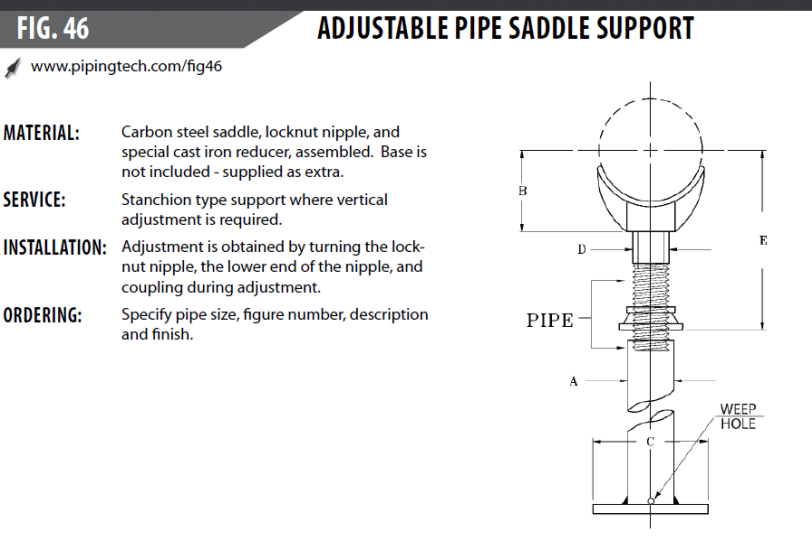
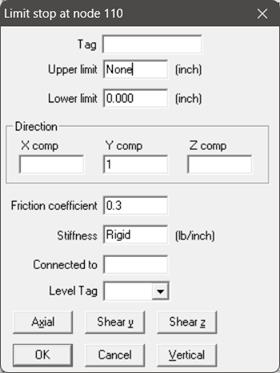
Support Mapping Code for PD2CAEPIPE / checkSTRESS / HOTclash / CAEPIPE 3D+
|
Particulars
|
Syntax
|
Support Data
|
|
Single Acting Translational Restraint
| ||
|
+Y
|
Restraint Type(Stiffness:Gap:Friction Coefficient)
|
+Y(R:0:0.3)
|
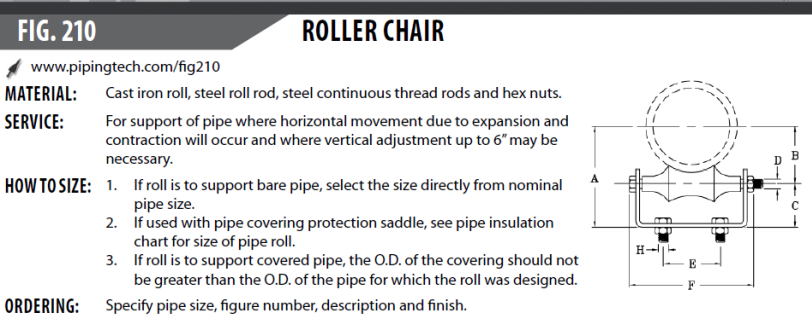
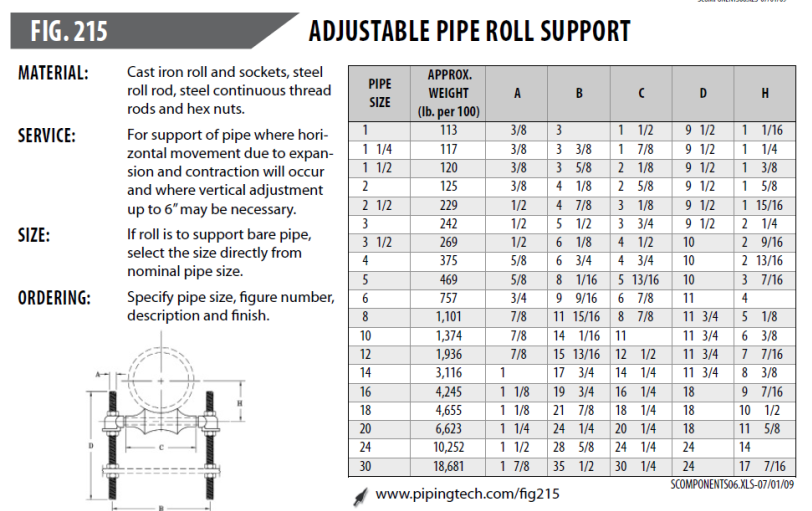
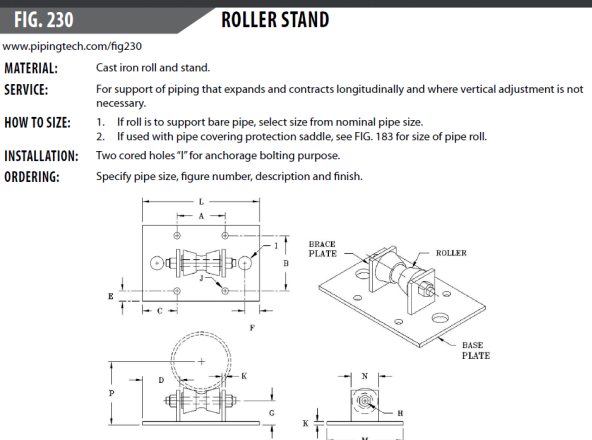
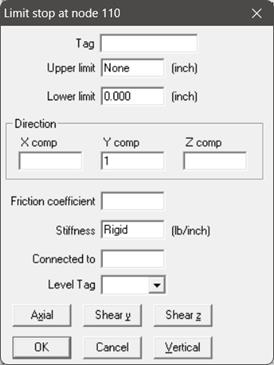
Enter the Friction coefficient as 0.0 or leave it as BLANK as the roller allows the pipe move freely axial direction.
Support Mapping Code for PD2CAEPIPE / checkSTRESS / HOTclash / CAEPIPE 3D+
|
Particulars
|
Syntax
|
Support Data
|
|
Single Acting Translational Restraint
| ||
|
+Y
|
Restraint Type(Stiffness:Gap:Friction Coefficient)
|
+Y(R:0:0.0)
|
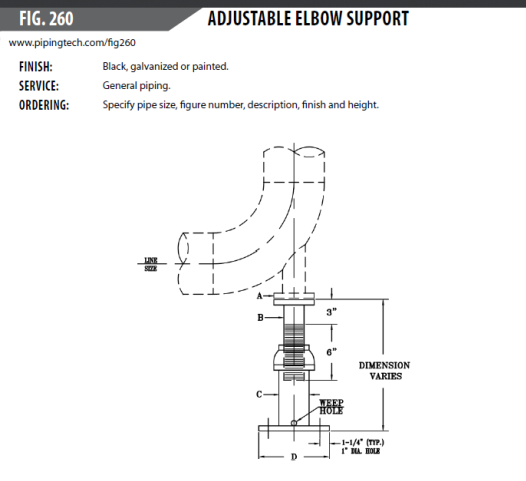
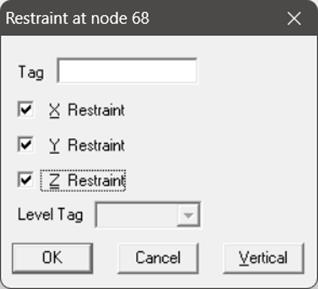
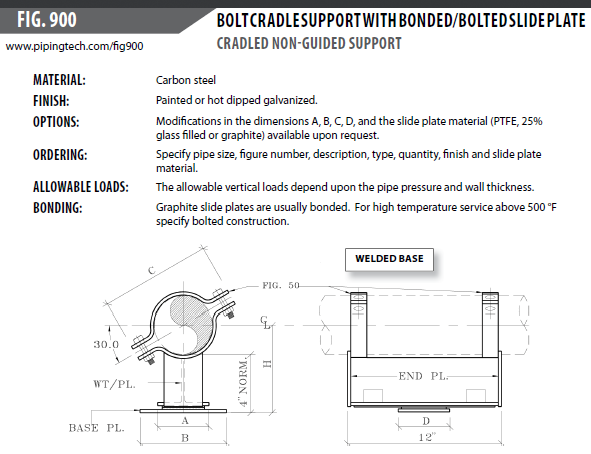
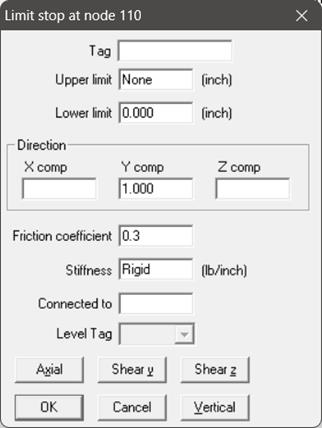
From the figure above, it is assumed that the Flanges A and B are connected using Bolts and the Plate D at the bottom of the support is fixed to structure with Bolts. Accordingly, the support is modelled as a 3-way Restraint. In case the Flanges A and B are not connected using Bolts and are free to move in upward and lateral directions then the support can be modelled as a Limit Stop with a suitable friction coefficient.
Support Mapping Code for PD2CAEPIPE / checkSTRESS / HOTclash / CAEPIPE 3D+
|
Particulars
|
Syntax
|
Support Data
|
|
Double Acting Translational Rigid Restraints
| ||
|
XYZ
|
X;Y;Z
|
X;Y;Z
|
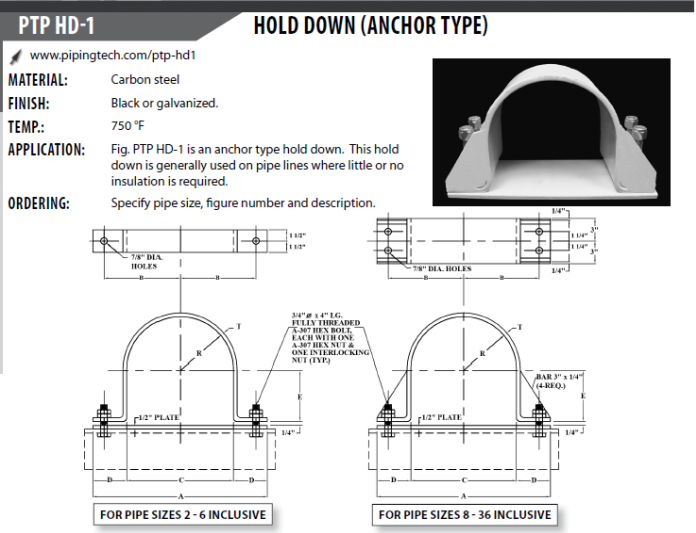
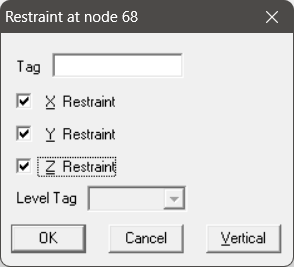
It is assumed that the support shown above does not allow the pipe to move in all three translation directions. Accordingly, this support is modelled as a 3-way Restraint.
If the piping is parallel to any of the Global axis, then use Restraint as given below.
Support Mapping Code for PD2CAEPIPE / checkSTRESS / HOTclash / CAEPIPE 3D+
|
Particulars
|
Syntax
|
Support Data
|
|
Double Acting Translational Rigid Restraints
| ||
|
XYZ
|
X;Y;Z
|
X;Y;Z
|
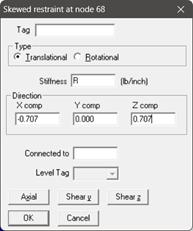
If the piping is skewed in horizontal plane or in 3D space, then use Skewed Restraint when Gap and Friction are 0 as shown below. For the snapshots provide below, the pipe is skewed in X and Z plane with Y axis as vertical.
Support Mapping Code for PD2CAEPIPE / checkSTRESS / HOTclash / CAEPIPE 3D+
|
Particulars
|
Syntax
|
Support Data
|
|
Double Acting Skewed Restraints in Local Axes*
| ||
|
Axial
|
SKEWA(Stiffness:Gap:Friction Coefficient:Type)
Type: R = Rotational Restraint T = Translational Restraint
|
SKEWA(Rigid:0:0:T)
|
|
Shear Y
|
SKEWY(Stiffness:Gap:Friction Coefficient:Type)
|
SKEWY(Rigid:0:0:T)
|
|
Shear Z
|
SKEWZ(Stiffness:Gap:Friction Coefficient:Type)
|
SKEWZ(Rigid:0:0:T)
|
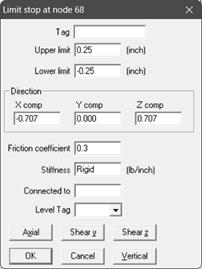
If the piping is skewed in horizontal plane or in 3D space, with Gap and Friction non-zero, then model this support as a Limit Stop as given below.
Support Mapping Code for PD2CAEPIPE / checkSTRESS / HOTclash / CAEPIPE 3D+
|
Particulars
|
Syntax
|
Support Data
|
|
Double Acting Limit Stops in Local Axes*
| ||
|
Axial
|
LIMA(Stiffness:Gap:Friction Coefficient) or LIMA(Stiffness:Lower Gap/Upper Gap:Friction Coefficient)
|
LIMA(R:0.25:0.3)
|
|
Shear Y
|
LIMY(Stiffness:Gap:Friction Coefficient) or LIMY(Stiffness:Lower Gap/Upper Gap:Friction Coefficient)
|
LIMA(R:0.25:0.3)
|
|
Shear Z
|
LIMZ(Stiffness:Gap:Friction Coefficient) or LIMZ(Stiffness:Lower Gap/Upper Gap:Friction Coefficient)
|
LIMA(R:0.25:0.3)
|
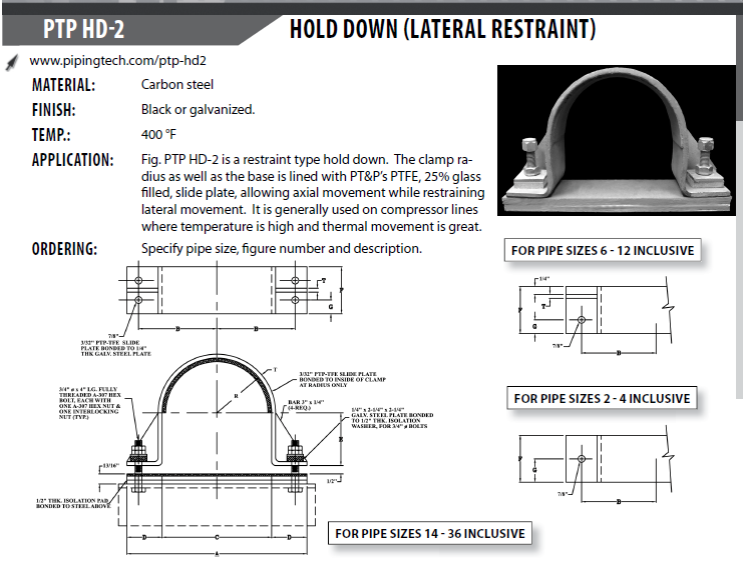
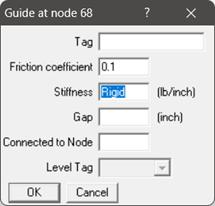
Note:
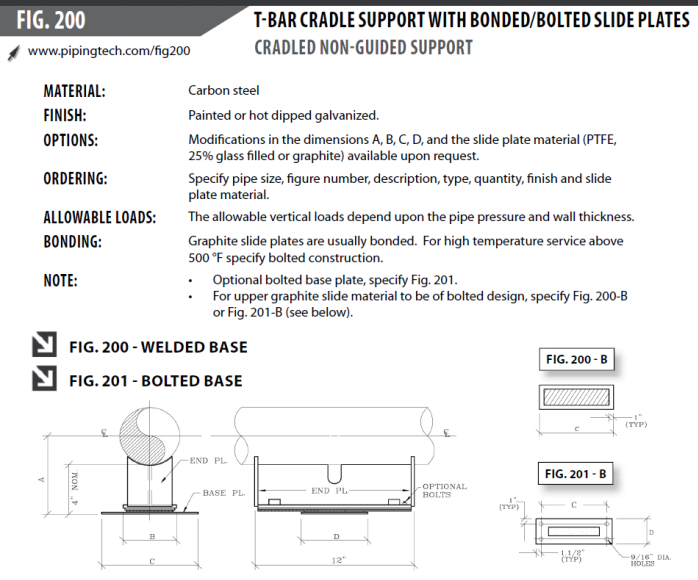
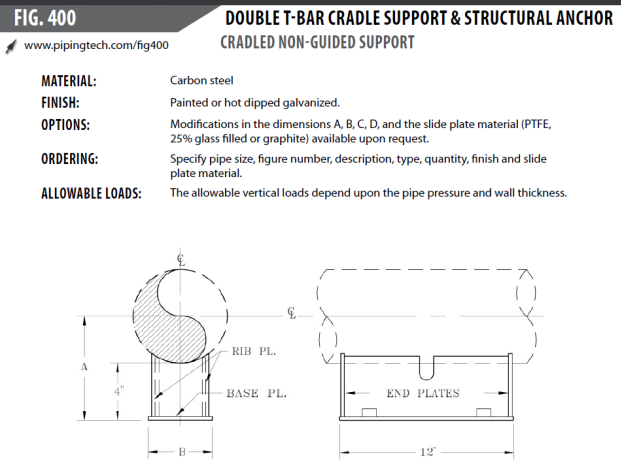
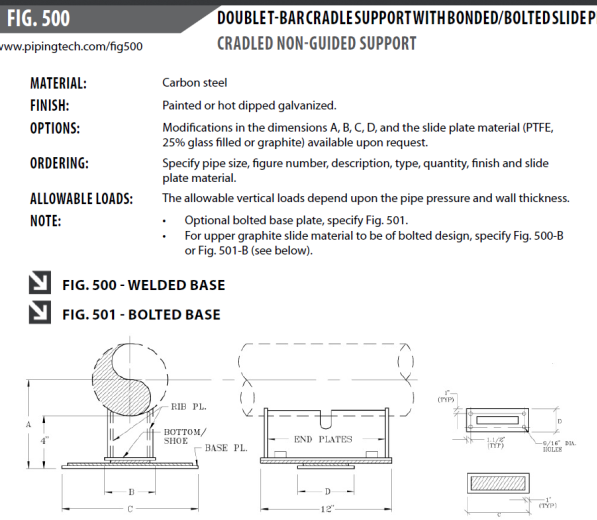
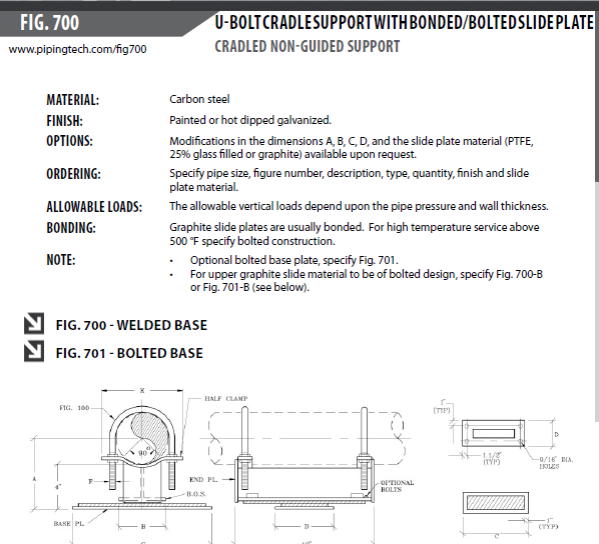
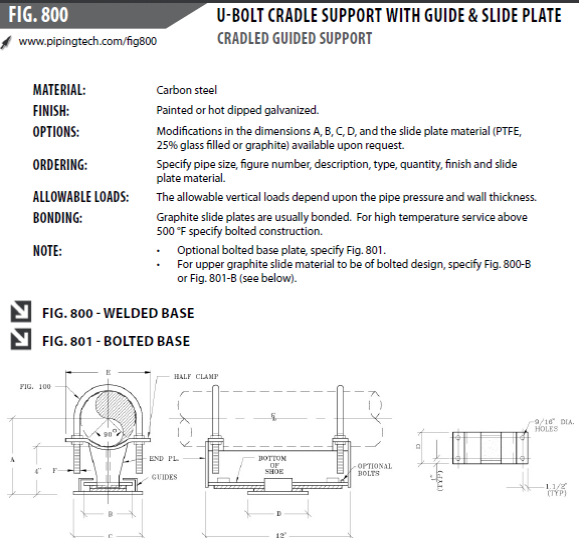
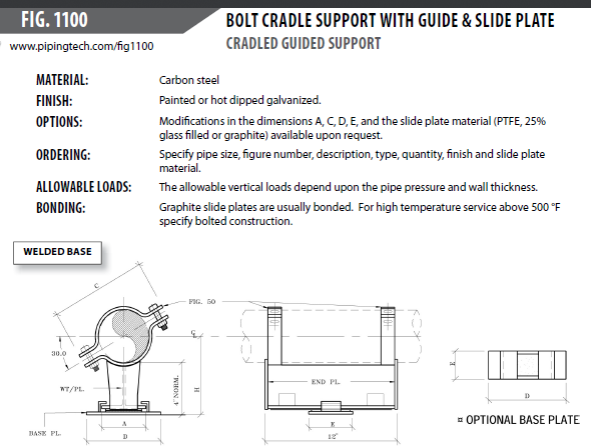
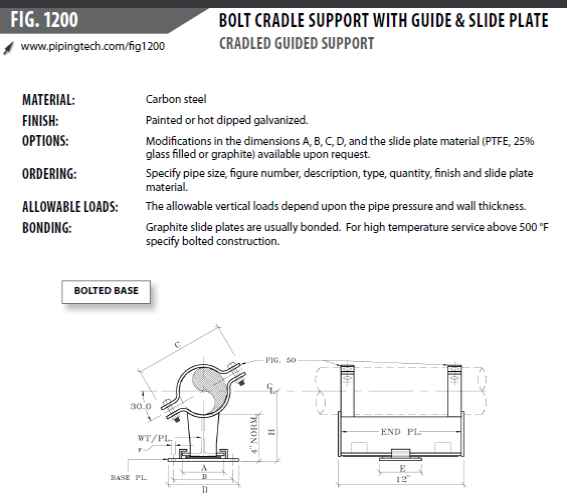
Friction coefficient is input as 0.1 as the PTFE plate reduces the friction between the support and pipe surface.
Support Mapping Code for PD2CAEPIPE / checkSTRESS / HOTclash / CAEPIPE 3D+
|
Particulars
|
Syntax
|
Support Data
|
|
Guide
| ||
|
GUI
|
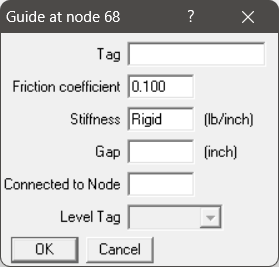
GUI(Stiffness:Gap:Friction Coefficient)
|
GUI(RIGID:0:0.10)
|
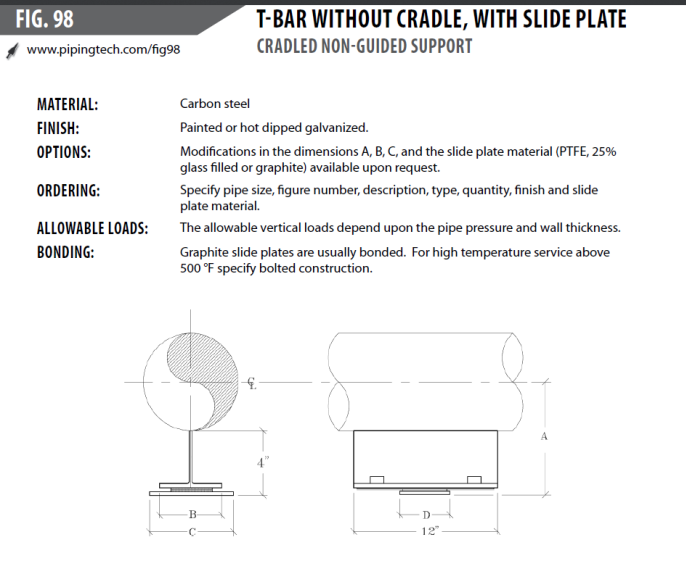
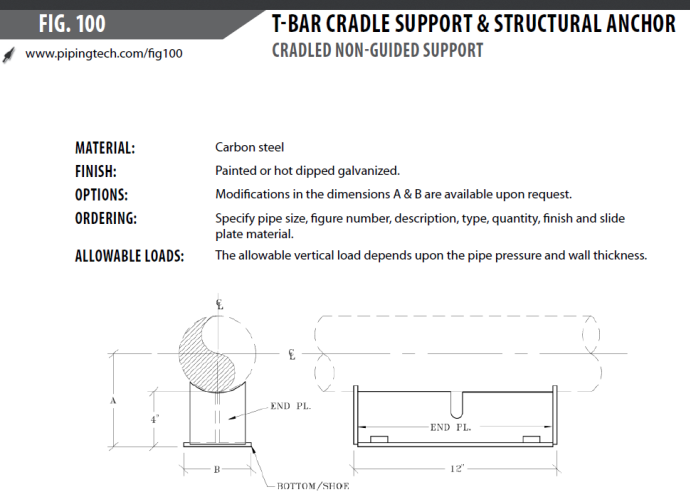
Support Mapping Code for PD2CAEPIPE / checkSTRESS / HOTclash / CAEPIPE 3D+
|
Particulars
|
Syntax
|
Support Data
|
|
Single Acting Translational Restraint
| ||
|
+Y
|
Restraint Type(Stiffness:Gap:Friction Coefficient)
|
+Y(R:0:0.3)
|
Note:
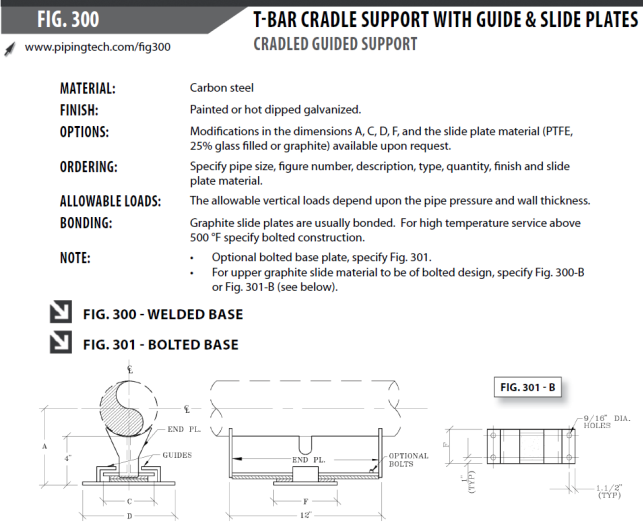
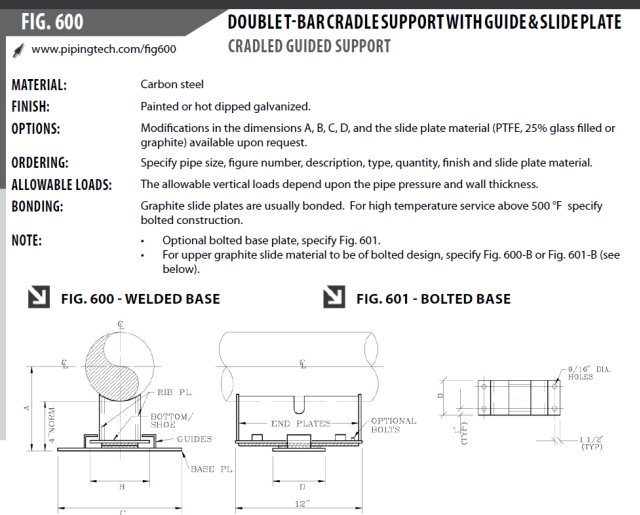
Friction coefficient is input as 0.1 as the PTFE plate reduces the friction between the support and pipe surface. If PTFE plate is not used in the support then change the friction coefficient to a higher value to account for the friction between the support and the structure.
Support Mapping Code for PD2CAEPIPE / checkSTRESS / HOTclash / CAEPIPE 3D+
|
Particulars
|
Syntax
|
Support Data
|
|
Guide
| ||
|
GUI
|
GUI(Stiffness:Gap:Friction Coefficient)
|
GUI(RIGID:0:0.1)
|

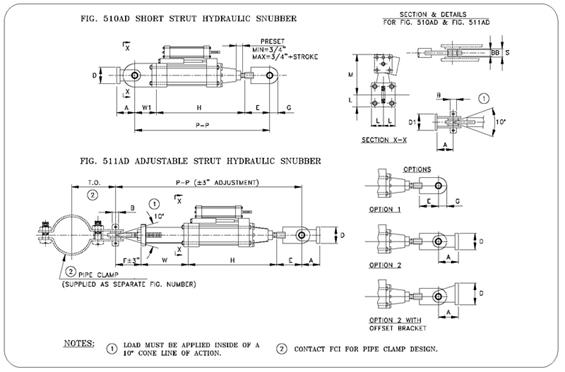
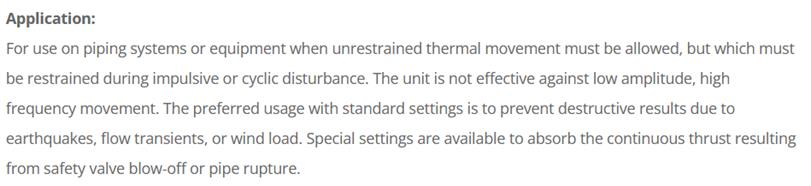
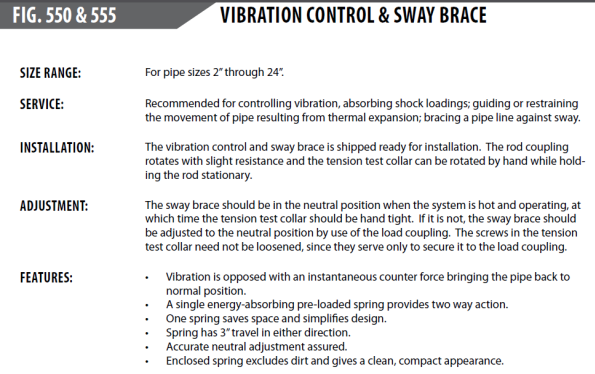

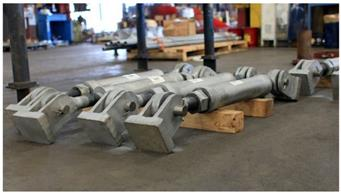
Use Snubber data in CAEPIPE to model the Snubber as shown above. Enter the direction based on direction of the Snubber.
If the piping is parallel to Global Z axis, with Snubber is in Global X, then define the Snubber as shown below.

Support Mapping Code for PD2CAEPIPE / checkSTRESS / HOTclash / CAEPIPE 3D+
Depending on the direction of the snubber, input the Support Data as shown below.
|
Particulars
|
Syntax
|
Support Data
|
|
Double Acting Snubbers
| ||
|
XSNB
|
XSNB(Stiffness)
|
XSNB or XSNB(1E12)
|
|
YSNB
|
YSNB(Stiffness)
|
YSNB or YSNB(R)
|
|
ZSNB
|
ZSNB(Stiffness)
|
ZSNB or ZSNB(RIGID)
|
|
Skewed Snubbers
|
SNB(VecX:VecY:VecZ:Stiffness)
|
SNB(0.707:0.0:0.707:RIGID) or
SNB(0:0:0.707:RIGID)
|
|
Double Acting Snubbers in Local Axes
| ||
|
SNBA (Axial)
|
SNBA(Stiffness)
|
SNBA or SNBA (1E12)
|
|
SNBY (Shear Y)
|
SNBY(Stiffness)
|
SNBY or SNBY(R)
|
|
SNBZ (Shear Z)
|
SNBZ(Stiffness)
|
SNBZ or SNBZ(RIGID)
|
Hangers
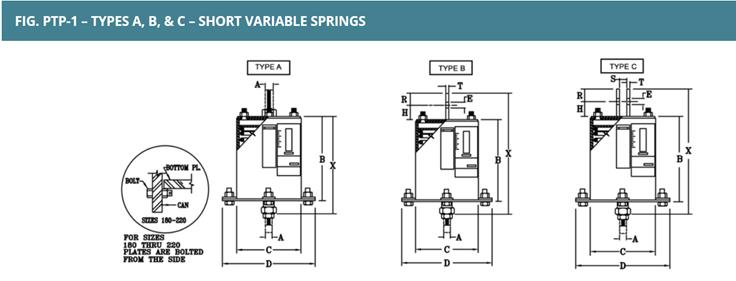
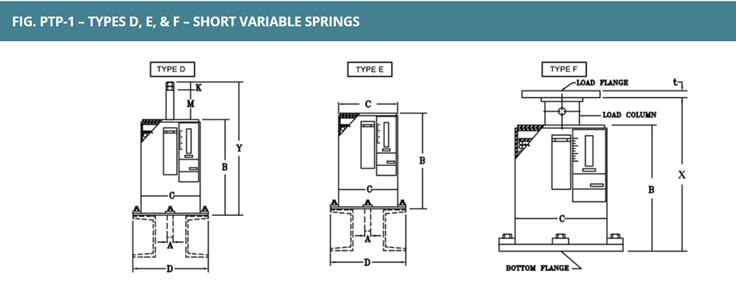

Note:
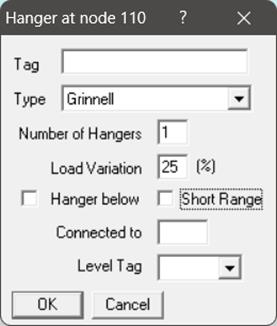
Turning ON the option “Hanger below” will show the Hanger Graphical Symbol below the Pipe in CAEPIPE without any changes to the mathematical model.
Support Mapping Code for PD2CAEPIPE / checkSTRESS / HOTclash / CAEPIPE 3D+
|
Particulars
|
Syntax
|
Support Data
|
|
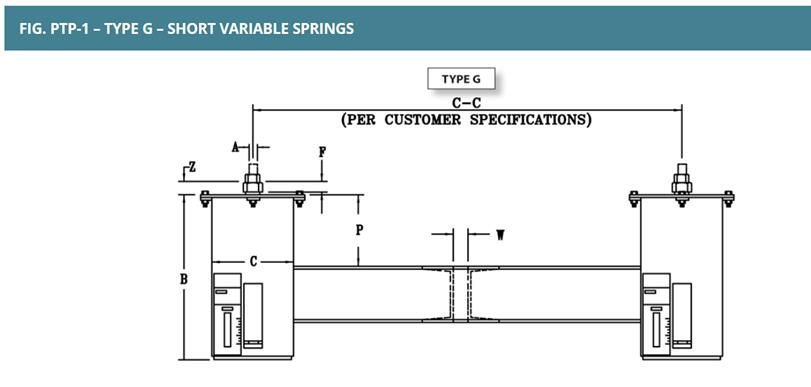
Spring Hangers
| ||
|
Hanger
|
Hanger(Type:No.of Hangers:All.Travel Limit:Load Variation:Short Range)
|
Hanger(Grinnell :1: 25:1)
|
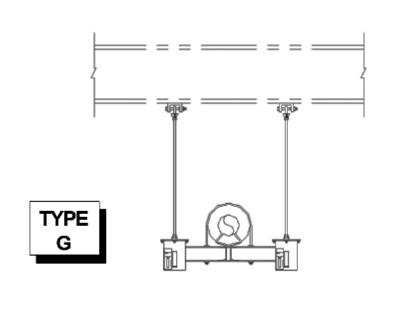
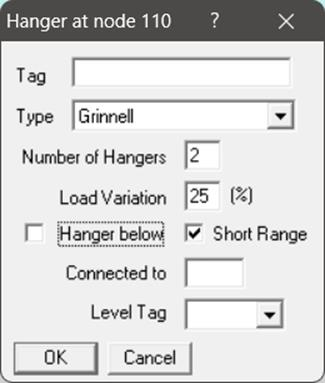
Support Mapping Code for PD2CAEPIPE / checkSTRESS / HOTclash / CAEPIPE 3D+
|
Particulars
|
Syntax
|
Support Data
|
|
Spring Hangers
| ||
|
Hanger
|
Hanger(Type:No.of Hangers:All.Travel Limit:Load Variation:Short Range)
|
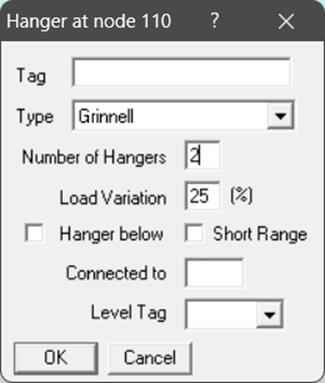
Hanger(Grinnell :2: 25:1)
|
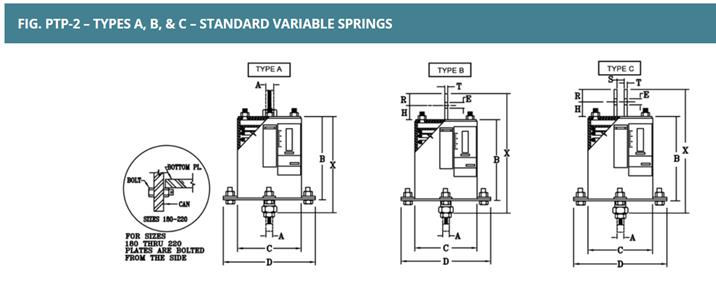
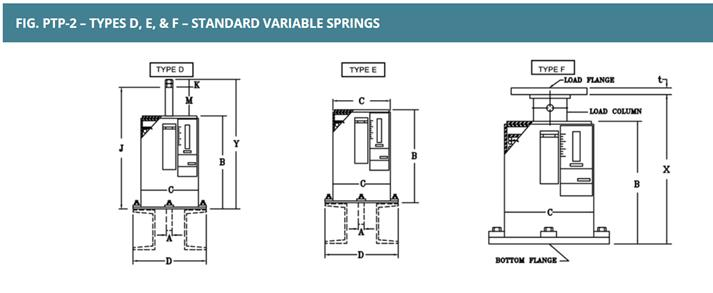
Support Mapping Code for PD2CAEPIPE / checkSTRESS / HOTclash / CAEPIPE 3D+
|
Particulars
|
Syntax
|
Support Data
|
|
Spring Hangers
| ||
|
Hanger
|
Hanger(Type:No.of Hangers:All.Travel Limit:Load Variation:Short Range)
|
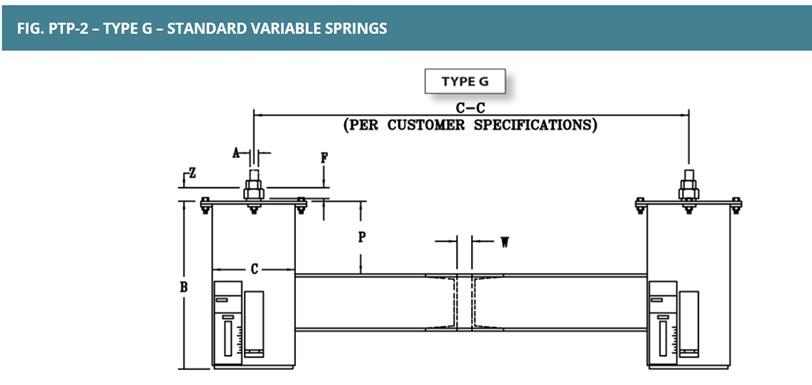
Hanger(Grinnell :1: 25)
|
Support Mapping Code for PD2CAEPIPE / checkSTRESS / HOTclash / CAEPIPE 3D+
|
Particulars
|
Syntax
|
Support Data
|
|
Spring Hangers
| ||
|
Hanger
|
Hanger(Type:No.of Hangers:All.Travel Limit:Load Variation:Short Range)
|
Hanger(Grinnell :2: 25)
|
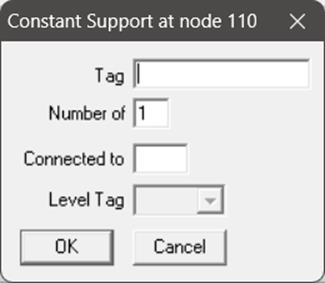
Support Mapping Code for PD2CAEPIPE / checkSTRESS / HOTclash / CAEPIPE 3D+
|
Particulars
|
Syntax
|
Support Data
|
|
Constant Support Hangers
| ||
|
Constant Support Hanger
|
Hanger(CONSTSUPPORT:No.of Hangers)
|
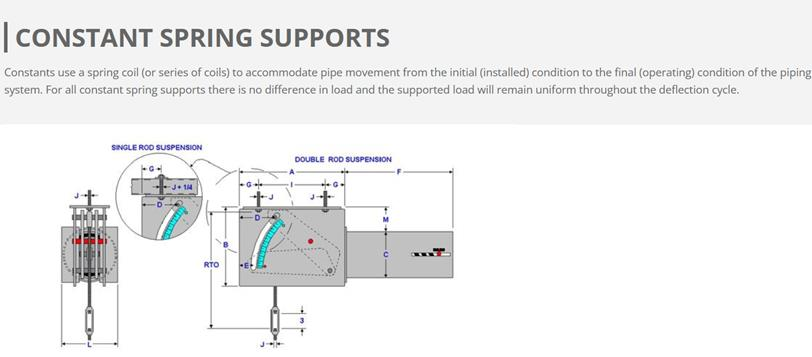
Hanger(CONSTSUPPORT)
|