

Software Solutions
- CAEPIPE 3D+
- dataTRANSLATORS
- checkSTRESS
- HOTclash
- PEXit
- Pricing Request
- Download CAEPIPE 3D+
- Download Free Evaluation
- Download Free Review Module
- Customer Support
Engineering Services
- Design and Engineering
- INFOplant™ System
- Engineering Management
- List of Projects
- Project Gallery
- Project Videos
Learn More
Company Information
NSP_HOST Configuration
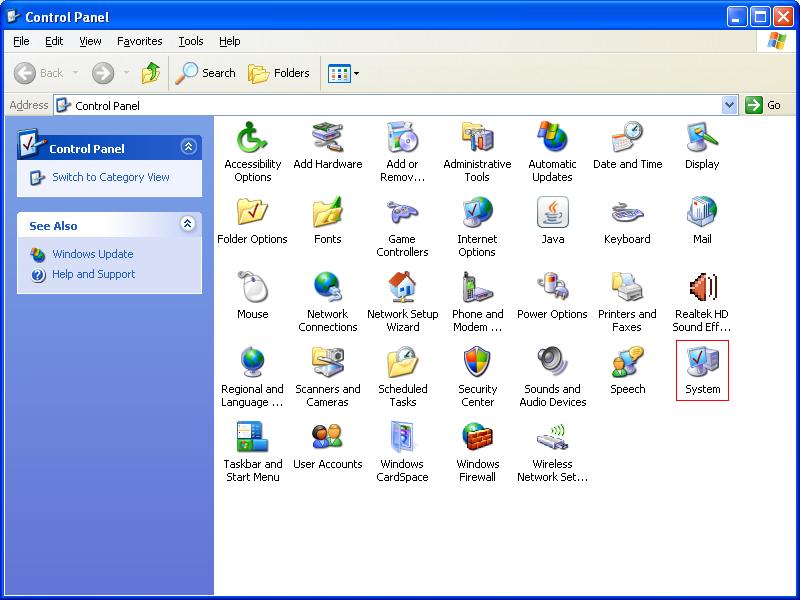
Step 1 - Open Control Panel
Open the Control Panel and double-click on the System icon.
Step 2 - Go to Environment Variables
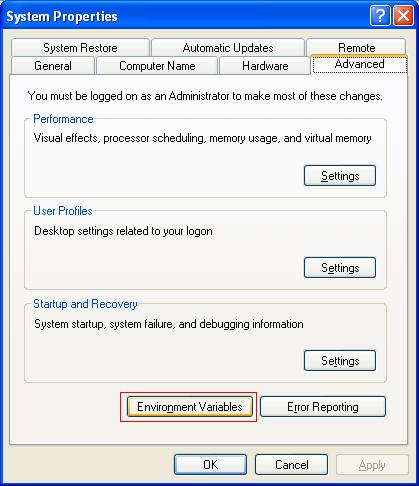
After opening the System Properties window, select the Advanced tab.
Next click on the Environment Variables button.
Step 3 - Add NSP_HOST Variable
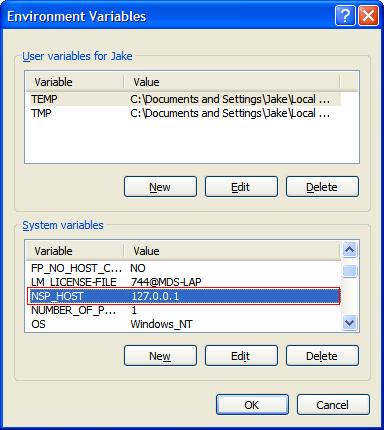
After opening the Environment Variables window, add a new System Variable.
Enter "NSP_HOST" in the Variable field.
Enter the IP Number/Hostname of the computer on which the hardware key resides on in the Value field. In some environments, specifying an IP address works (and not the Hostname). If using a hostname (fully qualified), be sure to flush your DNS cache and/or restart the DNS service, if working across subnets.
Note: If the hardware key resides on the same computer as CAEPIPE, for your IP Number/Hostname, you will use either:
A. 127.0.0.1
B. localhost
C. A static IP Number - Check with your Network Administrator
As noted above, preferably specify the IP address (not the hostname).